
Your sixth digital sense.
Powerful solutions.
KiroPilot it provides a set of solutions to complement your other aids for mobility and perception of the environment.
LinDO complements the white stick with three-dimensional LiDAR perception. It detects objects at torso height in real time and warns you in advance.

Melodyc, your device for learning to play piano chords from notes directly in your ear. Soon

Naviax, the wearable that guides you in the open sea using real-time sounds. Soon
There are obstacles that the white cane or the guide dog cannot detect.
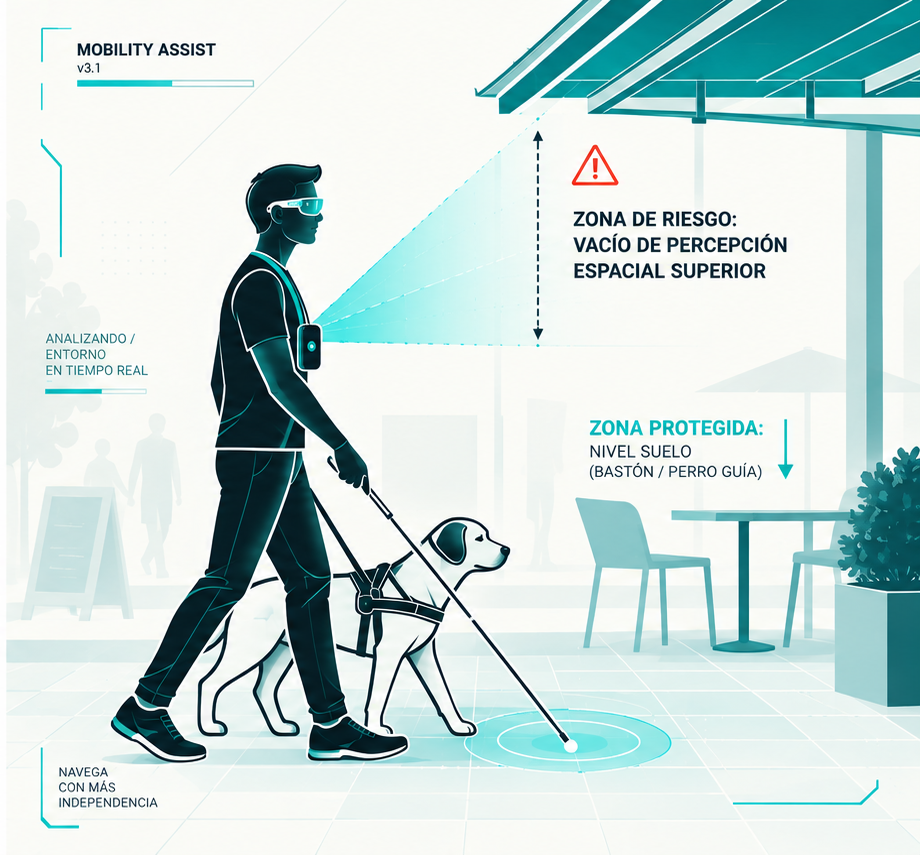
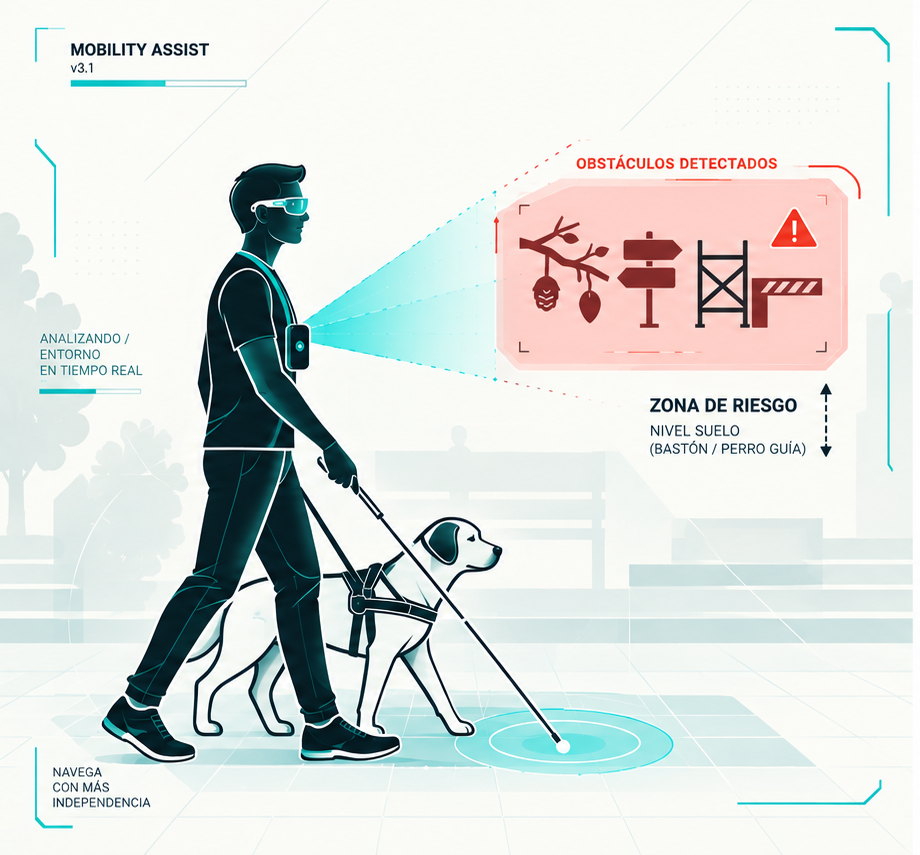
In your urban mobility, branches, signs, awnings, and protruding elements may be out of reach of the white cane and/or the guide dog. KiroPilot LinDO It expands the range of perception in that critical area without replacing the mobility aids you already use.
What the white cane/guide dog reaches
0.0m — 0.7m
Flooring, handrails, changes in tactile texture, stairs and direct obstacles on the floor.
What KiroPilot LinDO detects
0.7 m — 2.0 m
Any suspended element, at chest and head height, such as branches, marquees, awnings, traffic signs, etc...
Smart alerts
Acoustic and haptic warnings hierarchized according to the distance of impact, to alert without causing shocks.
Hands free
Your dominant hand is always free, preserving the tactile sensitivity that the white cane requires.
3D Perception
Continuous mapping of the volume of air in your trajectory, between 0.7 meters and 2 meters in height.
Total privacy
Local processing on the device. No video sending or storage on servers.
No need for the Internet
Always available wherever you need it, as it works without an internet connection.
KiroPilot LinDO
The mobile device detects it. You receive the alert.
KiroPilot LinDO It expands the perception in that critical area when you need it, in a simple way and without the need for an Internet connection.
1. Launch KiroPilot LinDO on your iPhone with LiDAR.
Use the app without an internet connection.
2. Configures the detection distance via Voice.
Adjust the detection distance of objects with your voice and in your language (for now in Spanish, Catalan or English).
3. Hang your device from the chest.
Position the mobile device with the cameras and sensors oriented towards your trajectory.
4. Let KiroPilot LinDO explore.
Your device will analyze your trajectory to detect objects suspended in front of you in real time.
5. LinDO will alert you in time if there is a risk.
With sound and vibration, it warns you of the detected risk.
The solution
KiroPilot LinDO. How does it work?
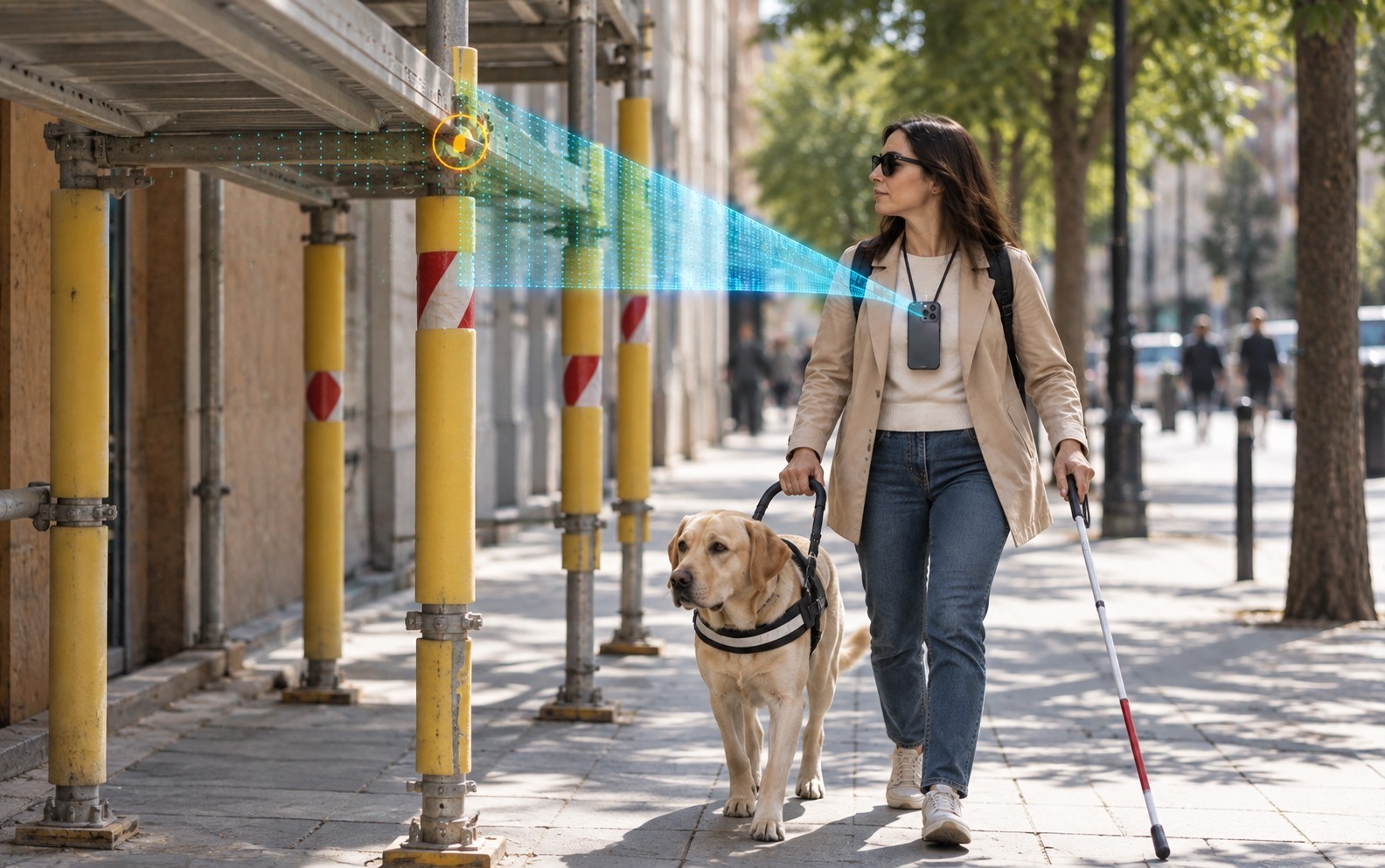
KiroPilot LinDO, With the support of your mobile phone's LiDAR sensor, it observes the front space, interprets geometrically relevant objects, and emits comprehensible warning signals before reaching the contact distance.
01
Detects
Your mobile phone's LiDAR sensor, attached to your neck or chest harness, scans the air volume up to 2 meters away, identifying suspended objects in your path and outside the rod's plane.
02
Interprets
The local calculation engine calculates lower, upper, distance and relative trajectory coordinates. It classifies each object into levels of urgency to avoid overstimulation.
03
Warning
It emits spatial auditory pulses in bone conduction headphones and subtle haptic pulses. Your environmental hearing and your hands are completely clear.
KiroPilot LinDO in action
From detection to reaction
Direct telemetry captures during field testing with blind users. Tracking frames and level coordinates calculate the safe passage margin.

Case 01 · 44 cm (0.44 m)
Rama at the height of the head
Base altitude: 2.00 m · Base altitude: 2.06 m. Priority red alert of imminent impact.

Case 02 · 89 cm (0.89 m)
Distinctive architectural element
Inflection point: 1.16 m · Sup inflection point: 1.54 m. Horizontal projection of the facade at the thoracic level.

Case 03 · 67 cm (0.68 m)
Distance and priority
Calibrated ground Y = -1.26 m · 213 active points. Sequential estimation of the collision vector.
It works wherever you are. Your data is always with you.
Vision through a device should not compromise the personal privacy of those who share public space.
KiroPilot LinDO It works completely disconnected from the internet, Without emitting position coordinates or storing displacement profiles.
The stick is still in your hand.
It does not replace the white cane or the guide dog. Kiropilot LinDO extends the detection area at the top, so you can walk more safely during your travels.
Listen to it. Feel it.
Tactile modulation and sound warnings that you adjust according to your hearing sensitivity through the volume.

Compatibility, testing, and accessibility
KiroPilot LinDO it responds to the needs of blind or visually impaired people in their mobility.
Device with LiDAR system
Designed for devices equipped with a LiDAR sensor and bone conduction headphones that keep the ear free during driving.
Evaluated in real-world environments
We validate real scenarios with branches, awnings, and suspended objects specifically placed to adjust the thresholds of audible warnings.
Accessibility criteria
KiroPilot LinDO is accessible and compatible with screen readers, making the application accessible, just like a website.
Important
KiroPilot LinDO It has been developed exclusively as a support tool. It should never be used as the main navigation technology or exclusively for travel by blind or visually impaired people.
Requirements and Usage Rules
- CompatibilityIt requires devices with a LiDAR sensor (Apple Pro models) and the latest version of iOS installed.
- PlacementFor optimal operation, the device must be hung at chest level (it is recommended to use a strap-mounted case). The orientation of the phone (even if it is upside down) does not affect the detection.
Precautions and Limitation of Liability
- PrecautionsThe precision of KiroPilot LinDO It may vary depending on the conditions of the environment. We strongly recommend practicing in controlled environments until you become familiar with its use in coordination with the white cane and/or the guide dog to build up the necessary confidence with the application.
- ResponsibilitiesThe user assumes full responsibility for evaluating the operation and weighing the operation of the application, the conditions of the environment, and the risks associated with its use. KiroPilot LinDO, The user accepts that the application is a support and assistance tool and absolves the developers from any liability for any incident, personal injury or damage to third parties resulting from an erroneous interpretation or improper use of the technology.
I want to try KiroPilot LinDO
If you are a blind or visually impaired person, orientation and mobility instructor or representative of a sector organization, sign up to receive availability notifications.
Total confidentiality and ethical treatment of data.
KiroPilot LinDO is currently in the technical validation phase. Availability by phases.
© 2026 Kiropilot your sixth digital sense